I decided to write this article after seeing an advertisement on Avito: «access to all neural networks for 200 rubles.» Essentially, people are selling access to free services, which I will describe below. These services can be accessed and used for free on your own.
Arena.ai — Free access to the 409 neural network model
Arena.ai (formerly LMArena) is a website where you can compare the responses of different neural networks and vote for the best one. User votes form a public ranking of the models, and the site itself serves as a convenient platform for testing: with a single prompt, you can test two neural networks simultaneously. It is a free platform for using AI models.
How to compare two neural networks yourself
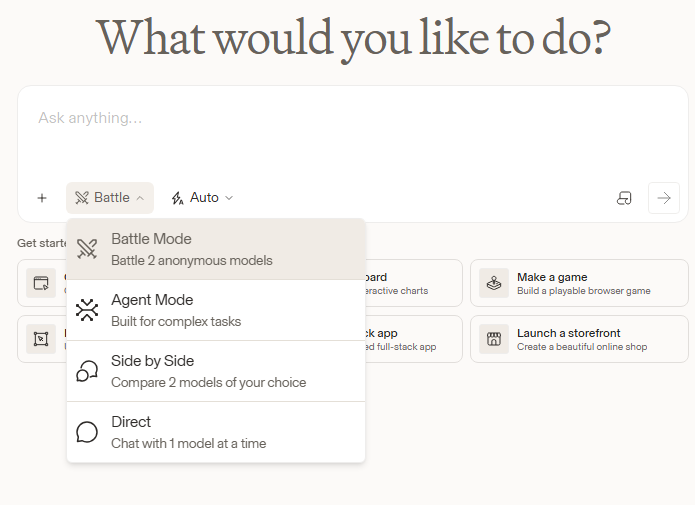
Step 1. Find a prompt where you are interested in both AI models' responses. Open arena.ai. Below the «Ask anything…» field, click on the mode name (default is Battle) and select Side by Side—to «compare two models of your choice.» This same list also includes other modes: Agent Mode for complex tasks and Direct—a chat with a single model.
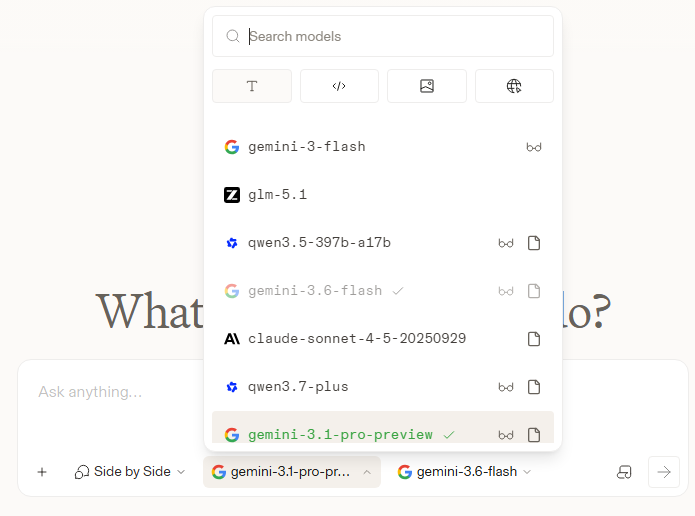
Step 2. Two lists of models will appear next to the mode name. Click on each one and select a neural network: the list includes search by name and tabs by task type—text, code, images, web search. For example, you can place Google Gemini and Anthropic Claude models side-by-side.
Step 3. Write one prompt and submit it—both models will respond simultaneously, allowing you to see the difference immediately. If you want to evaluate the answers without brand influence, return to Battle mode: the site will display two responses from two hidden models, and their names will only be revealed after you vote.
What models are currently trending on Arena.ai
Arena maintains separate leaderboards for various tasks: general text (Chat), Code, Image, Video, Search, and others. As of September 26, 2026, the general text leaderboard features 409 models and over 8.5 million votes. In the top ten, there are seven Anthropic models (headed by Claude Opus 5.5 with 1,509 points), two Meta models (Muse Spark), and one Google model—Gemini 3.8 Flash.
Important disclaimer: the gap between the leaders is very small. For the model ranked first, the range of possible positions (Rank Spread) is from 1st to 10th, and it currently has about 2,300 votes. Therefore, it is best to read the ranking as a group of strong models rather than a strict podium. Advice: compare models for your own tasks; do not submit personal data. Take the best suggestions from each model.
llmarena.ru — free access to Russian neural networks
LLM Arena (llmarena.ru) — a Russian benchmark for LLM models in Russian. It also features an anonymous arena and a VS mode: you select two models from the lists, pose a single question, and vote for the best response. There is a separate arena for image generation and a leaderboard. The list of models includes YandexGPT, GigaChat, as well as OpenAI, Anthropic, Google, DeepSeek, Qwen, and others.
The models here are noticeably older than those on Arena.ai—for example, Claude lists Opus 4.7, while the current top on Arena is Opus 5.5. However, in my experience, the queues are shorter. So, for quick comparisons or for requests in Russian, llmarena.ru is a convenient backup. It’s helpful when the servers on Arena.ai are overloaded.
Qwen AI. Create your free library on your mobile phone
Qwen—Alibaba’s neural network: it operates in the browser at chat.qwen.ai, and there is also a mobile application. There are currently three models listed. Qwen3.7-Plus is a high-performance model from the Qwen3.7 series for text and multimodal tasks (it is the default). Qwen3.8-Max is the flagship model from the Qwen3.8 series. Qwen3.8-Omni-Flash is the newest natively multimodal model that accepts text, images, audio, and audiovisual content.
Qwen3.8-Omni-Flash was released on September 18, 2026. According to the developers, it has a context window of up to 1 million tokens, and its audio understanding surpasses Gemini 3.8 Flash; the results for video are comparable. These are statements from Alibaba itself, though they have not been independently verified.
To the right of the prompt bar is a button with a sound wave icon; it has two modes: «Voice Chat» and «Video Chat.» Video Chat allows you to turn on your camera and show the AI a subject, page, or diagram, discussing what you see via voice. Important: Voice and Video Chat are not supported in guest mode—you must sign in to an account first.
The «+» button next to the input field opens a toolkit: you can attach a file, image, video, or audio, enable web search and «Deep Dive, ” generate an image, or initiate web development. The „More“ section includes artifacts, a „Learning Mode, ” and a trip planner. Some items, such as video creation and slides, are inactive in guest mode.
Projects: A chat with your books and Telegram channels
With Qwen, you can create an analogue to projects: upload books as files or export an entire Telegram channel to discuss the material—ask questions, request summaries, or find specific sections. You can export a channel’s history using the «Export Chat History» feature in Telegram Desktop. This cannot be tested in guest mode; you must log into an account. Therefore, please check the service itself for the limits on file size and number of files.
DeepSeek: a search engine that reads hundreds of websites
DeepSeek can be opened for free at chat.deepseek.com. Next to the input bar, there are two buttons: «Deep Thinking» and «Smart Search.» In my experience, even the standard «Smart Search» now finds hundreds of websites. Previously, this level of coverage was only available in the «deep search» mode across various neural networks. DeepSeek does not publish an exact number of sources; in older reviews, its search only scanned 10–12 pages.