Tool Concept
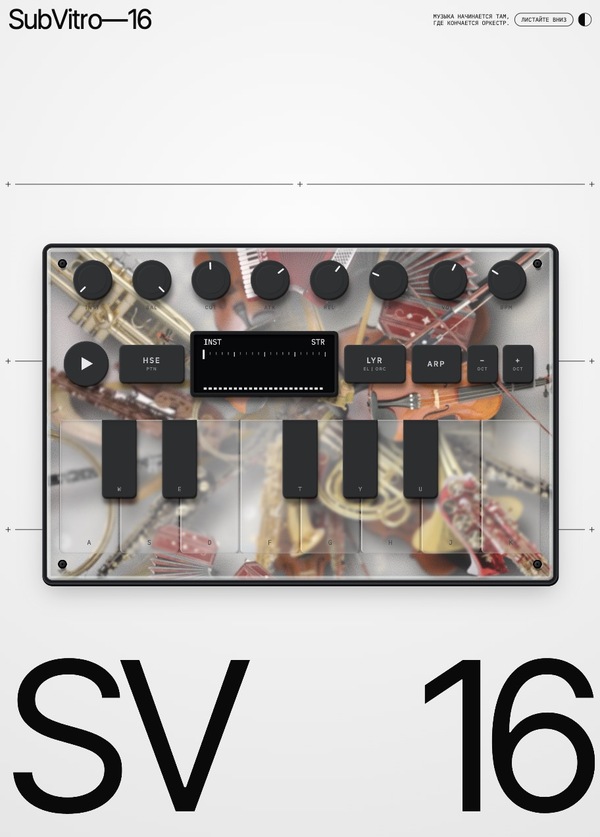
SubVitro—16 is a web synthesizer that merges the classical orchestra with electronic sound. The name means «under glass» (from the Latin sub vitro): traditional instruments are placed beneath a matte glass panel, while the electronic interface rests on top of it.The synthesizer’s sound is composed of two layers: orchestral (strings, woodwinds, harp, and others) and electronic (eight synthesizer timbres). These layers can be smoothly blended, or the keyboard can be divided into electronic and orchestral halves. The sound is enhanced by a filter, effects, an arpeggiator, and a rhythm section with four patterns.The instruments under the glass respond to the music. When a note sounds, instruments belonging to that class rise toward the glass and become sharp, before settling back down. Drum beats lift them, bass notes vibrate the panel, and tilting the device shifts them across the glass. The arrangement of the instruments is reconfigured with every session, meaning the synthesizer looks unique every time.The sound can be not just heard, but also seen.
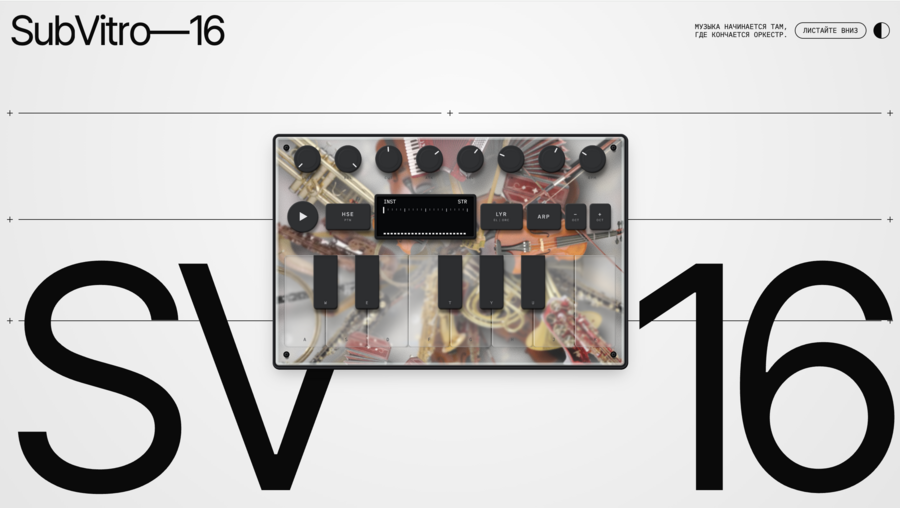
«Music begins where the orchestra ends»
This is the project motto, a rephrasing of the well-known saying, «Where words end, music begins.» Just as music expresses what words cannot convey, the synthesizer unlocks sounds that are inaccessible to an acoustic orchestra.
In the orchestra, there is an established language of classical sound—complete with its timbres, rules, and boundaries. The synthesizer begins at that boundary. It does not negate the orchestra or argue with it; rather, it continues it—adding new timbres, processing, and rhythm.
In this project, this idea is shown literally: the classical instruments lie beneath the glass as the foundation and source. The electronic interface is placed on top, and the glass serves as the boundary between them. When a note sounds, the corresponding instrument rises toward the glass—old and new meet in a single point for an instant.
Tool Style
For the project, I also decided to separately design the website. Since my synthesizer merges 1) a contemporary interpretation with 2) a foundation in vintage analog synthesizers and classical aesthetics, it was important to retain the «materiality» inherent in classic objects. I aimed to achieve this through web-synthesizer animations that trigger as the user scrolls down the page. This creates the sensation for the user that they are interacting with a real product, not just a website.
As a design solution, I chose the Neo-Swiss style because it is built upon the same principles as the synthesizer itself: order, clarity, and minimalism. Ideologically, this style was also very close to my project. The Neo-Swiss style emerged in the mid-20th century as a universal language devoid of ornamentation, around the same time as electronic music. A strict grid, grotesque typeface, and contrast in scale create a calm, almost technical framework, akin to a blueprint or technical marking.
The page remains monochromatic, so that the synthesizer featuring classical instruments under glass is the only vibrant, colored object. The design does not adorn the music; it gives it space.
How the tool works
SubVitro-16 has few functions, and that is a conscious design choice. While studying the synthesizer, I was particularly drawn to some older machine designs—for example, the 1970s «String Machines» (which simulate orchestral strings via electronic generators), classic analog synthesizers, grooveboxes, and others. I appreciated the philosophy: each element is responsible for one clear idea. There aren’t too many features, and each one plays a specific role, much like an instrument in an orchestra.
So, here’s what I came up with: eight knobs—INST cycles through all 11 instruments, BAL mixes the orchestra and electronics, CUT sets the sound brightness, ATK and REL control how the note begins and decays, FX manages both echo and reverb, VOL controls the volume, and BPM sets the tempo. The buttons trigger the rhythm, switch between four rhythm patterns, engage the arpeggiator, shift the octave, and divide the keyboard into electronic and orchestral halves. The display shows only what you are currently adjusting, so extraneous labels and screens aren’t necessary. This creates a more satisfying user experience because the user feels maximum feedback from their interactions with the instrument.
Similar to portable grooveboxes, the limitation here applies to music: the instrument requires no study; you can start playing immediately—with a mouse, a finger, your computer keyboard, or a MIDI keyboard—and a complete melody will result.
Behind the simple interface is extensive logical and structural work—there isn’t a single recorded sound in the synthesizer. This decision was also made consciously. The orchestra lies under glass: you can see it, but you cannot hear it. Everything that sounds is reborn at the moment of pressing a key. Rejecting recordings is also a rejection of a copy. A recorded sound always sounds the same; here, every note is created for the first time and will never repeat exactly, just like a live performance. The orchestra is composed of sound waves directly in the browser. The synthesizer composes the melody for the rhythm section itself, anew every time, and the echo is tuned to the tempo and always falls into rhythm.
Minimalism supports the project’s core concept. The fewer elements on the glass, the better the view of what’s beneath—the classic instruments that come alive with every note. The sounds rise toward the glass and become sharp; rhythmic impacts propel them, and the layout changes with every interaction. Even the CUT knob alters not only the sound but also the glass itself: the deeper the sound, the more matte the glass becomes. The interface takes a backseat so that the music and its connection to the orchestra remain the main focus.
Voices, Effects, and Channels
In SubVitro-16, there are two voices: an orchestral voice (strings STR, woodwinds WND, harp HRP) and an electronic voice (eight synthesizer timbres: SIN, SAW, SQR, BAS, CHO, ORG, NOI, SPC). You can blend them smoothly with the BAL knob or divide the keyboard into two halves with the LYR button: electronics play on the left, and the orchestra plays on the right.
Every voice has its own chain: sound is born from oscillators, passes through an envelope (ATK and REL determine how a note begins and decays), and then through a CUT filter, which either brightens or dulls the sound. After that, the sound enters the master effects chain: distortion, tremolo, echo, and reverb, along with a compressor and limiter at the output. The echo is synchronized to the tempo (BPM), so it always lands in the beat. The FX knob controls the echo and reverb simultaneously. The rhythm section «grooves» the sound: when the kick drum hits, the other voices momentarily attenuate.
The sound is distributed across channels: the orchestral voice sounds more to the left, the electronic sound more to the right, the rhythm section is centered, and the reverb is stereophonic. This is why the two voices are heard distinctly even when they play together.
Interface Naming and Structure
The interface consists of three groups: knobs, buttons, and a display with a keyboard. All names are short, in Latin script, in uppercase, and describe the function rather than the effect. This naming convention reads like labels on the panel of a real instrument.
Knobs (continuous parameters): INST, BAL, CUT, ATK, REL, FX, VOL, BPM. Buttons (toggle switches): ▶ starts the rhythm, HSE / TRP / BRK / DUB switch the four rhythm patterns (PTN designation), ARP engages the arpeggiator, − OCT and + OCT shift the octave, and LYR divides the keyboard (EL | ORC designation). The display only shows the knob you are currently turning: its name, value, and sound spectrum. Therefore, extra labels and screens are unnecessary. Below the display are 13 keys, which correspond to the a w s e d f t g y h u j k keys on a computer.
Performance Screencast
Prompt Design: Working with Claude
The idea, concept, and all design decisions in this project are mine. I conceived a synthesizer where the orchestra lies under glass, and the electronics are positioned on top of it. I also selected the slogan, the Neo-Swiss design style, the monochromatic layout, and the scroll-based animation. The mood board and prototype in Figma are also my work. I did not write the code myself; Claude Code generated it based on my descriptions, and I acted as the art director and tester.
Therefore, the primary task was prompt design—I needed to articulate the objective to the neural network in such a way that it would generate my specific instrument, rather than a typical synthesizer.
- Concept First, Code Second. My initial prompt wasn’t «make a web synthesizer.» I described the idea: orchestra and electronics as two layers, glass as the boundary, and every sound must be generated anew, without pre-recorded samples. Because of this, all the sound is generated in the browser using the Web Audio API.2. Constraints as Part of the Prompt. I set strict boundaries: only eight controls, each corresponding to one idea, and the labels needed to be short and in all caps, like on vintage hardware. If the neural network suggested adding a feature, I rejected it, because minimalism was central to the concept.3. References Instead of General Terms. I didn’t write, «make it beautiful.» I described specific references: 1970s string machines, groove boxes, neo-Swiss typography, and attached a Figma mood board. This allowed the neural network to grasp the mood rather than guess.4. Small Iterations. I proceeded step-by-step: first the sound, then the controls, then the rhythm, then the glass and object physics. After each step, I listened to and observed the result. If the sound was hissing or harsh, I described exactly what I was hearing, not how to fix it in the code. This is how I landed on the output limiter and the tempo-synced echo.5. I Made the Decisions, Not the Neural Network. Claude offered options, but I made the choices: the balance between orchestra and electronics, how the instruments should move behind the glass, how matte the glass should be. The single metric was: does this decision reinforce the idea that «music begins where the orchestra ends»?
Conclusion: The neural network writes code quickly, but it doesn’t know why it’s needed. The idea creates the project, and prompt design is the way to convey that idea accurately without losing it along the way.