
Concept and Specialty
«Wheel of Fortune» is a web synthesizer inspired by the Tarot deck, where the unpredictability of fate becomes a musical principle. The composition evolves from calm to chaos and back again. The card itself functions as the interface: characters control the voices and effects, symbols determine the sound character, and the spinning wheel alters the notes and timbre. The «Fate» parameter amplifies randomness, so every performance sounds unique.
Style and Components
Card Image: The wheel and characters retain the composition of the Tarot. The paper grain and uneven lines unify all illustrations. Loading Screen: The Sphinx hovers, and clouds drift. Below it, a constant phrase about mystery and courage gently emerges. Color and Typography: Blue, ochre, red, and cream repeat the card’s palette. Book fonts support its antique nature: URW Bookman Demi is used for the Sphinx’s phrase, and Georgia for the interface annotations.
Two voices in stereo
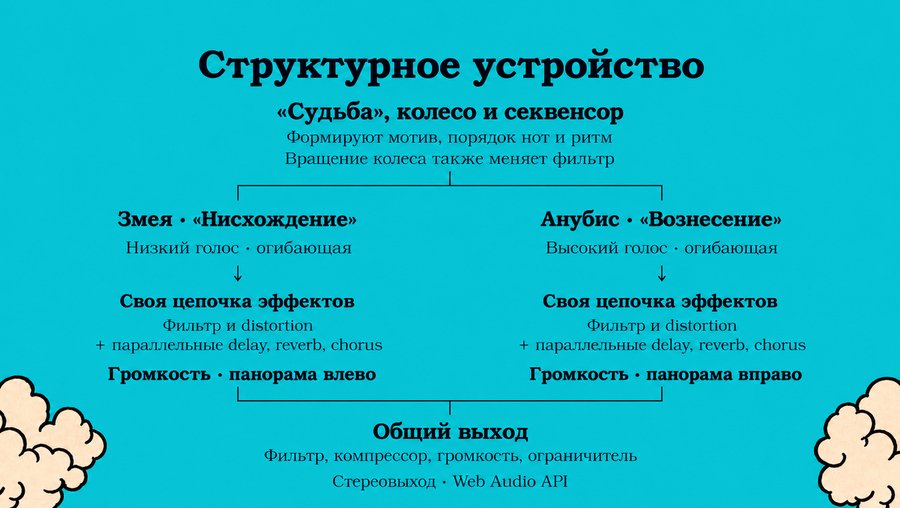
Descent — Serpent A triangular wave and a sine wave one octave lower create a soft, deep bass. A panorama of -0.82 shifts the voice to the left. Pressing toggles the voice on or off; engaging it during playback is accompanied by a downward pitch glide.Ascent — Anubis A sine wave and a quiet triangular overtone create a high, clear voice. A panorama of +0.82 shifts it to the right. Pressing toggles the voice on or off; engaging it during playback is accompanied by an upward pitch glide.Sound Processing Each voice has its own volume and timbre envelopes, a low-pass filter, and smoothly mixed distortion. Reverb, delay, and chorus operate in parallel. Then, the voice volume and its stereo placement are adjusted.Both voices pass through a common «Curtain» filter, a compressor, a master volume control, and a peak limiter. The sound is synthesized in the browser using the Web Audio API.
Four Keepers of Effect
Four Effect Modulators
Tapping a character toggles the effect for both voices on or off. The glow and movement indicate activity. These effects process sustained notes rather than creating separate parts.
Celestial Arch — Angel · Reverb Creates a space around the notes; the dispersed tail gradually fades.
Doppelganger — Eagle · Chorus Mixes in a short, delayed copy of the sound. The slow modulation of the delay creates a sense of shimmering and volume.
Flame — Lion · Distortion Alters the waveform shape and adds harmonics. The processed signal blends smoothly with the original, making the timbre denser and richer.
Memory — Bull · Delay Repeats the sound with a 0.58-second delay. Feedback creates a chain of gradually fading repetitions.
How the Processing Works Reverb, delay, and chorus are connected in parallel to the main signal, before the voice volume and stereo panning. Each voice has its own processing, and the characters control both voices' effects simultaneously.
The Wheel and the Steering of Destiny
Cycle of Change — Wheel The wheel’s position alters the pitch of the notes and the volume of the sound. Reversing the spin unpacks the motif’s sequence. The wheel can be manipulated with the mouse; its autonomous movement also affects the music. Four internal symbols control the envelope, while the outer letters maintain the map’s pattern.Curtain — Sphinx Pressing this gently opens or closes the master filter for both voices. An open «Curtain» allows more high frequencies through, while a closed one softens and muffles the sound.Fate — Star The higher the value, the more frequently the notes change and the wider the melodic leaps become. In manual mode, the tempo and note density also increase. The wheel moves faster and more unpredictably, changing direction more often. Each new launch creates a new motif.Presses increase the value, and after reaching the maximum, they begin to decrease it. Shift + click immediately reduces «Fate.»Performance Flow Manual performance begins by tapping the Serpent or Anubis. The development of the composition is determined by the actions taken during the performance. — ☉ Invocation — launches an automated composition lasting 3 minutes. — ◇ Seal of Silence — gently concludes the sound. — ∞ Eternal Return — toggles the repetition of the auto-composition. — ✧ Book of Signs — opens the control help documentation.
Note shape and volume
Four alchemical symbols within the envelope wheel control the contour of both voices: they determine how the volume and brightness of each note change over time.
Attack — Top symbol · Attack The time it takes for volume and brightness to build up. A small value yields a quick onset, while a large value results in a gradual sound appearance.
Decay — Right symbol · Decay The time taken to transition from the peak to the «Sustain» level. This determines how quickly the sound softens and quiets after the attack.
Sustain — Left symbol · Sustain The volume and brightness level after the decay. In this synthesizer, it also increases the duration the note is held.
Release — Bottom symbol · Release The time for the volume and brightness to fade: ranging from a short cutoff to a long, trailing decay.
Presence — Moon Changes the overall volume while maintaining the ratio between the two voices. The higher the value, the more intense the glow.
Shadow Weight — Left rhombus Controls the volume of the Serpent, which is predominantly heard in the left channel.
Light Weight — Right rhombus Controls the volume of Anubis, which is predominantly heard in the right channel.
How Values Change Key presses increase the value to maximum, then decrease it to minimum—and the cycle repeats. Shift + press immediately reduces the value. Changes to the alchemical symbols are audible on subsequent notes; already sounding tails are preserved.
Naming Principle The names describe the action through imagery: «Attack» is the sound appearing, «Release» is it disappearing, «Weight» is the volume of an individual voice, and «Presence» is the overall instrument volume.